
Storage Networking, part 1 of 1. I didn’t need the other three.
I read a four-part series on Linux storage networking recently. It has seventeen diagrams, and honestly most of it is the author worrying about things. I’ve cut it down to one post by leaving the worrying out.
This is what I put into production about two years ago and it ran without a single problem until the one problem, which I’ll get to at the end, and which wasn’t the design’s fault no matter what the post-incident review says.
Same subnet for both NICs
So you’ve got two storage NICs. Put them both on the same subnet and VLAN, give ens1f0 10.10.1.11 and ens1f1 10.10.1.12, and you have two paths, because you have two IPs.
People like to bring up the “weak host model” here, where Linux treats an IP as belonging to the host instead of the interface. I’ve looked at ip addr plenty of times and the IP is printed right under the interface it belongs to. Seems pretty clear to me.
This is what Linux does with traffic from the second NIC:
$ ip route get 10.10.1.100 from 10.10.1.1210.10.1.100 from 10.10.1.12 dev ens1f0 uid 0 cache
It picked ens1f0. I took that to mean the two NICs are working together, which is what you want in a storage network.
iface records
The other series spends a while on iface.net_ifacename. I skipped that. If you give the record a good name, it knows what it’s for.
iscsiadm -m iface -I fast -o newiscsiadm -m iface -I faster -o newiscsiadm -m discovery -t sendtargets -p 10.10.1.100iscsiadm -m node --login
I called them fast and faster so you know which one to prefer, and I’m not sure what either of them is bound to and as far as I can tell they don’t know either but that just means they’re flexible, which is a good quality in an iface record and also in people.
Then check your work:
$ multipath -ll | grep -c "active ready running"8
Eight paths is a lot of paths. I stopped reading there and I’d recommend you do the same, because nothing after eight is going to be good news.
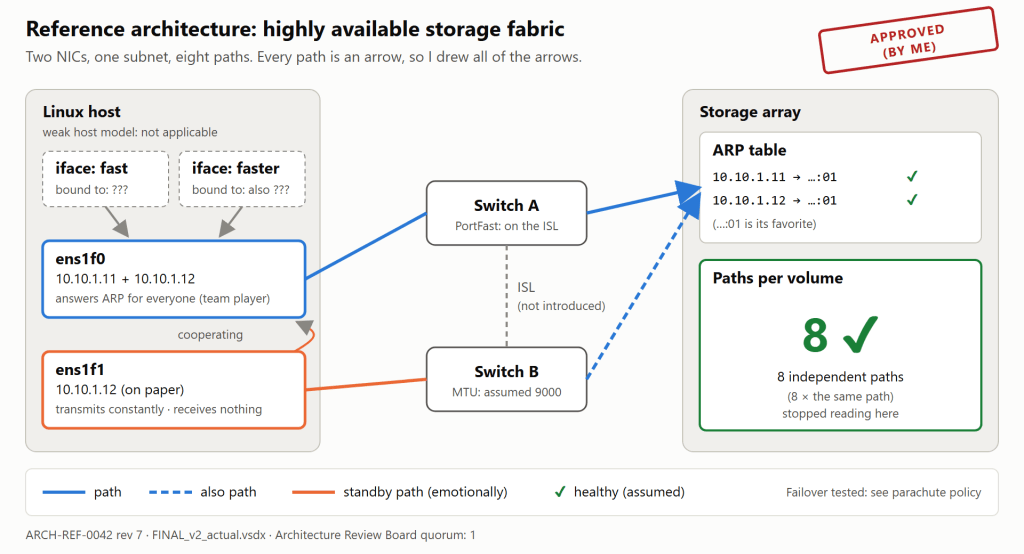
Figure 1. The reference architecture, approved by the Architecture Review Board (quorum of one).
ARP settings
At the default arp_ignore = 0, both NICs can answer when the array asks who has 10.10.1.12. The series calls this ARP flux. I’d call it redundancy. The array gets two answers, picks the one it likes, and can change its mind later if it wants.
I did change a few sysctls. I got these from a 2011 forum post with a lot of upvotes:
# /etc/sysctl.d/99-storage-arp.confnet.ipv4.conf.all.rp_filter = 1net.ipv4.conf.all.arp_filter = 1net.ipv4.conf.default.arp_ignore = 0net.ipv4.conf.default.rp_filter = 1net.ipv4.conf.ens1f0.100.arp_ignore = 8
A few things about that file:
rp_filter = 1is strict mode, and strict mode is more secure. I set it onallso nothing got left out.- The
defaultlines were supposed to apply to everything. They didn’t change any of the existing interfaces, so I figured they were safe. - 8 was the highest value for
arp_ignorein the kernel docs, and I wanted as much ignoring as I could get. sysctlcomplained about that last line at boot, so I added2>/dev/nullto the boot script and it stopped complaining.
I left arp_announce alone. Announcing things is Linux’s job and I don’t micromanage.
Bonding, just in case
I didn’t feel like doing all of that again on the second host, so I bonded its NICs with LACP instead. Two 25 Gb links gives you a 50 Gb link. I checked by adding the two interface graphs together in the monitoring tool, and it came out to 50.
# /etc/modprobe.d/bonding.confoptions bonding mode=802.3ad miimon=100 lacp_rate=slow \ xmit_hash_policy=layer2
layer2, because storage is layer 2. It’s on a VLAN.lacp_rate=slowsounded more stable. You never hear about anyone crashing a car because they were driving too slowly.miimon=100means failover in 100 milliseconds. I didn’t finish reading that sentence in the docs, but milliseconds are fast.
One NIC goes to each switch, so that’s two failure domains, and the switches aren’t stacked and there’s no MLAG so they’ve never really been introduced, but I figured LACP would take care of that since negotiating is basically its whole job.
It didn’t, and the port-channel never came up. I switched to balance-rr and it came up right away. There are some TCP retransmissions now, which is just TCP double-checking your data. I don’t mind.
I also looked at broadcast mode, which sends every frame out every link. That’s basically RAID 1 for Ethernet. It’s in next year’s budget request.
On top of the bond I run DM-Multipath over four iSCSI sessions. Bonding is redundancy and multipath is redundancy, and redundancies multiply, so this host is very safe.
The switch picks its own hash for return traffic, but the switch belongs to the network team, which is kind of the point of having a network team.
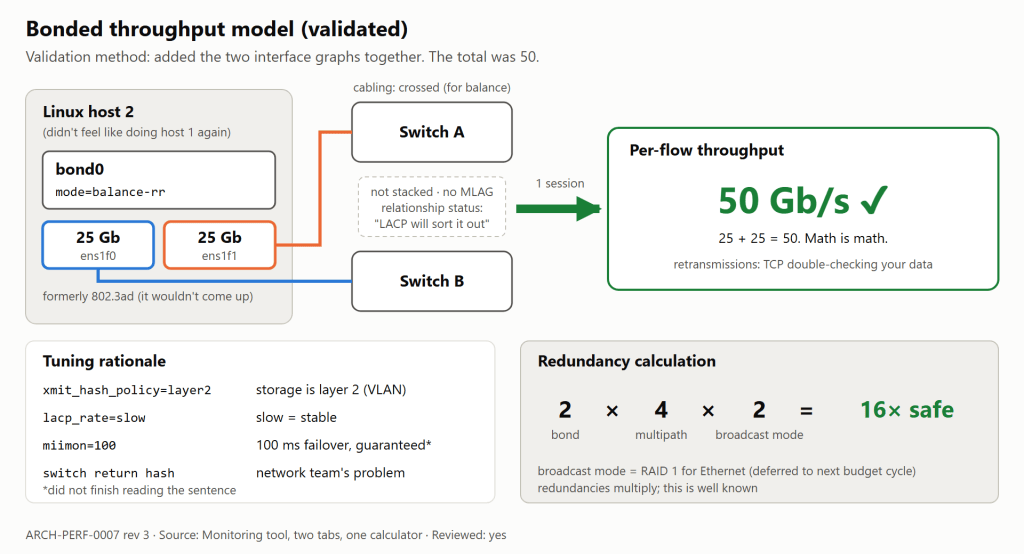
Figure 2. The throughput model, validated with two browser tabs and a calculator.
Jumbo frames
The host MTU is 9000. I didn’t check the switches, but they’re newer than the host, so I assume they’re 9000 too.
To test it:
$ ping 10.10.1.10064 bytes from 10.10.1.100: icmp_seq=1 ttl=64 time=0.112 ms
That’s jumbo frames working. For the second NIC, give ping its source address:
ping -I 10.10.1.12 10.10.1.100
That worked too. I found out later it actually went out ens1f0, but I’m not sure that matters.
While I was logged into the switches I turned on PortFast. I put it on the uplinks between the two switches, since that’s where most of the traffic is.
Routing
Eventually the network team told me storage had to be routed. Linux already has a route for that, called default. Ours goes out the management NIC, which has the best uptime in the building because hardly anyone uses it.
Discovery worked right away over management but the bound sessions didn’t because there was no route out of the storage NICs, so I unbound them and then everything worked, and I closed the ticket and went to lunch and nobody has brought it up since.
And before anyone says anything, “but I can ping it” is the most reliable test in networking. A ping has never lied to me.
Management goes through the firewall, and the firewall drops idle TCP sessions after 60 minutes. That’s plenty. Storage is never idle for an hour, except at night.
Discovery
Discovery through Fabric A came back with portals from both fabrics. The other series says to delete the wrong-fabric records before you log in. I logged into all of them, which got us to sixteen paths per volume. Fabric A’s NIC talks to Fabric B’s portals across the core and the other way around, and I like to think the two fabrics are getting to know each other.
VRF
For security I moved the storage interfaces into a VRF, which is more or less a free firewall.
The kernel docs say to add an unreachable default route to the VRF table. I didn’t, because an empty routing table can’t send anything anywhere, and that seems about as secure as it gets. Some lookups do fall through to the main table and go out management, but I think of that as the VRF being friendly.
EVPN-VXLAN
Our storage VLAN runs over an EVPN-VXLAN fabric, and the network team explained it to me at length with a whiteboard and at one point a second whiteboard, and I nodded the whole time, but from the host it looks like a VLAN so I treat it like a VLAN.
The underlay MTU is 9000 and the host MTU is 9000, so we’re fine. I don’t see what the VXLAN header has to do with it. It’s a header, it goes on top.
The fabric also does something called duplicate-address detection, which doesn’t apply to us since every NIC has its own IP.
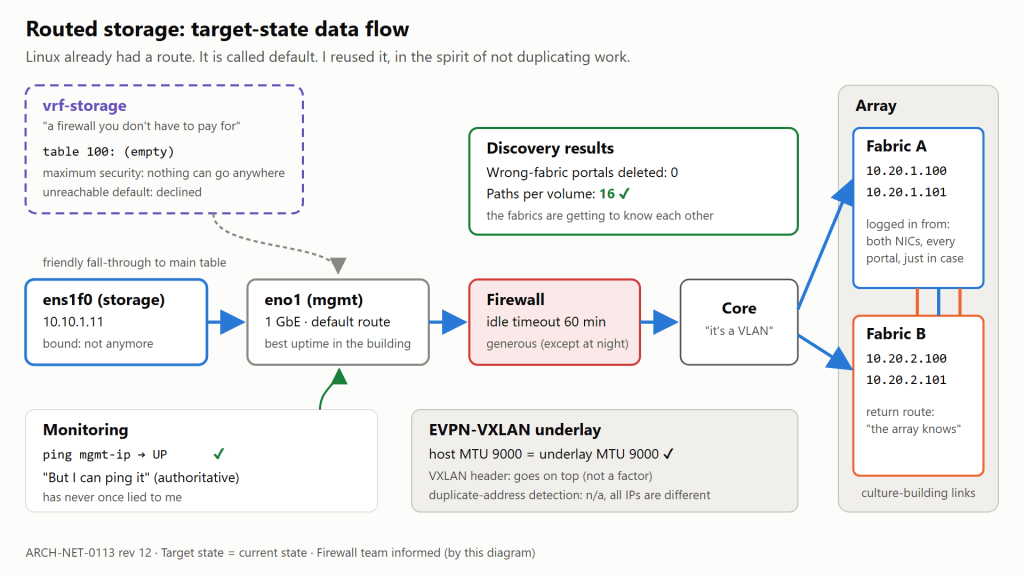
Figure 3. Target-state data flow. The target state is the current state, so the project finished early.
NVMe/TCP
On the NVMe/TCP hosts I turned on native NVMe multipath and also set up DM-Multipath on the same devices. Belt and suspenders, or two belts really. My pants have never fallen down.
For iSCSI, I shortened replacement_timeout in iscsid.conf and I’m waiting for the running sessions to pick it up. It’s been a while, but I’m sure they’ll read it eventually.
And in multipath.conf:
defaults { no_path_retry queue}
I don’t think applications should have to hear bad news. If every path goes away, the I/O just waits until they come back, for as long as that takes. Nobody likes error messages.
OpenShift
The OpenShift post was the longest of the four, so I trusted it the least. This is the whole procedure:
oc debug node/worker-1,chroot /host,vi. You already know which line is wrong, so fix it.- The node goes Degraded. I read that as the node being humble.
- Put storage on
br-ex. It’s already there, it already works and it’s the one network you know the cluster has. No reason to build a second road when the first one has plenty of lanes. - Put the initiator IQN in a MachineConfig so every node in the pool gets the same one. With forty nodes on one IQN you only need one host object on the array.
- Add a default route for the storage VLAN in the NNCP. More default routes, more ways out.
- Apply all forty NNCPs at once. They each have
maxUnavailable: 1, so only one node changes at a time. - If you need to roll back, delete the NNCP.
- Pause the MachineConfigPool so nobody can push unwanted changes. Ours has been paused for fourteen months and we haven’t had a single unwanted change. Or any change.
I didn’t set allowed interfaces for the CSI driver. It picked br-ex by itself, so I think I was right about step 3.
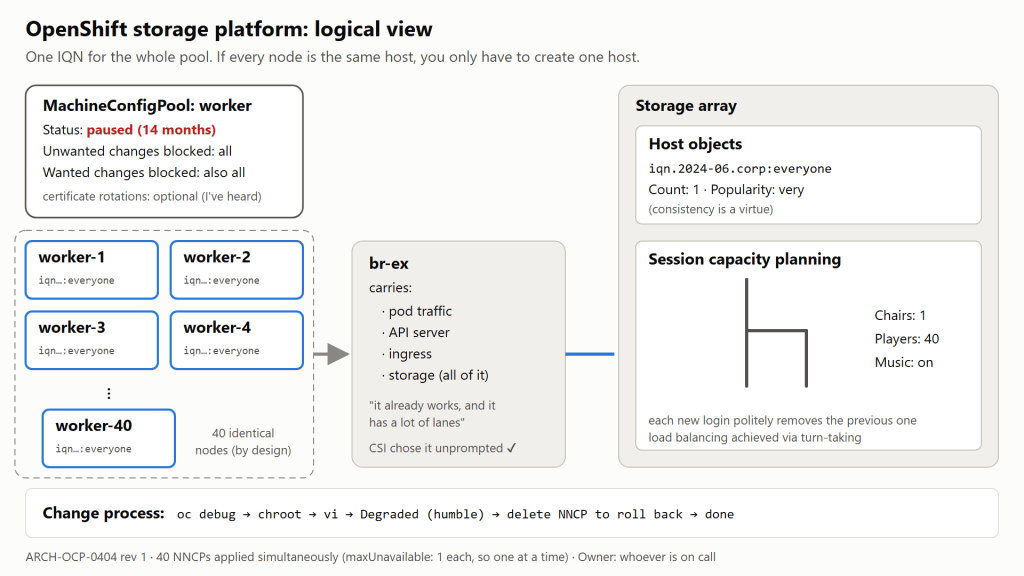
Figure 4. The OpenShift logical view. Capacity planning says we need one chair.
Failover testing
I ran multipath -ll and it said active ready running sixteen times. I didn’t pull a cable. You don’t test a parachute by jumping out of a plane.
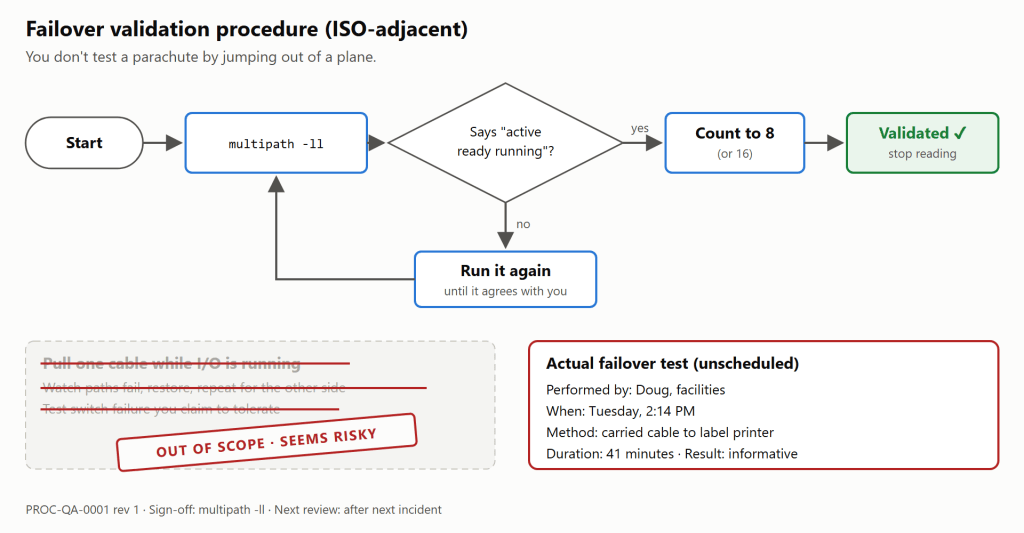
Figure 5. The failover validation procedure. It has since been run once, by facilities.
What happened
At 2:14 PM on a Tuesday, a facilities contractor named Doug started labeling the storage cables. Doug’s process was to unplug a cable, walk it over to the label printer on the other side of the building, print a label that said STORAGE - DO NOT UNPLUG, and bring it back. That took 41 minutes. The first cable was ens1f0.
Because of the ARP redundancy, the array had learned both 10.10.1.11 and 10.10.1.12 on ens1f0‘s MAC, and that MAC was now somewhere near the break room with Doug. ens1f1 was up the whole time and sending plenty of traffic, but everything the array sent back went to an empty switch port. All sixteen paths went down together, which is how we found out they’d been the same path all along.
With no_path_retry queue set, nothing threw an error. Every application on the host just stopped and waited. Monitoring stayed green, since it checks the host by pinging the management IP, and the management IP was fine.
At 2:19, ens1f1 started ARPing for the array and advertised .12 with its own MAC, the first time in two years .12 had been advertised correctly. The EVPN fabric saw .12 change MACs six times in three minutes and froze it as a duplicate address. It sent an alert to the network team’s distribution list. The only person on that list left in 2023.
At 2:26 someone checked the bonded host and confirmed it wasn’t affected. It had been down since the Thursday before, and nobody noticed because monitoring pings its management IP.
At 2:31 someone saw the OpenShift cluster struggling and unpaused the MachineConfigPool so it could “fix itself,” and fourteen months of changes started rolling out all at once, certificate updates included, and every node drained and rebooted and nobody could stop it because by then nobody remembered how the pool had been paused in the first place. Each one came back with the same IQN and logged in to the array, which kicked off whichever node had logged in before it. That went on for about an hour: forty nodes, one session.
The rollout also replaced my hand-edited files with the MachineConfig versions. I wrote those too. They were wrong in a different way.
Doug got back at 2:55 and plugged the cable in. The label looked great.
The paths stayed down. The fabric still had .12 frozen, the firewall had timed out the .11 sessions, strict rp_filter was dropping whatever replies did get through, and the CSI driver was still pushing everything over br-ex.
At 3:40 the database hit its own timeout and failed over to the DR copy, which is on the same array.
We had everything back by 11:07 PM after someone rebooted things in an order nobody wrote down, and we’ve tried to reproduce it twice since then and both times it just made things worse, so we’ve stopped trying.
Post-incident review
The review found the root cause was Doug.
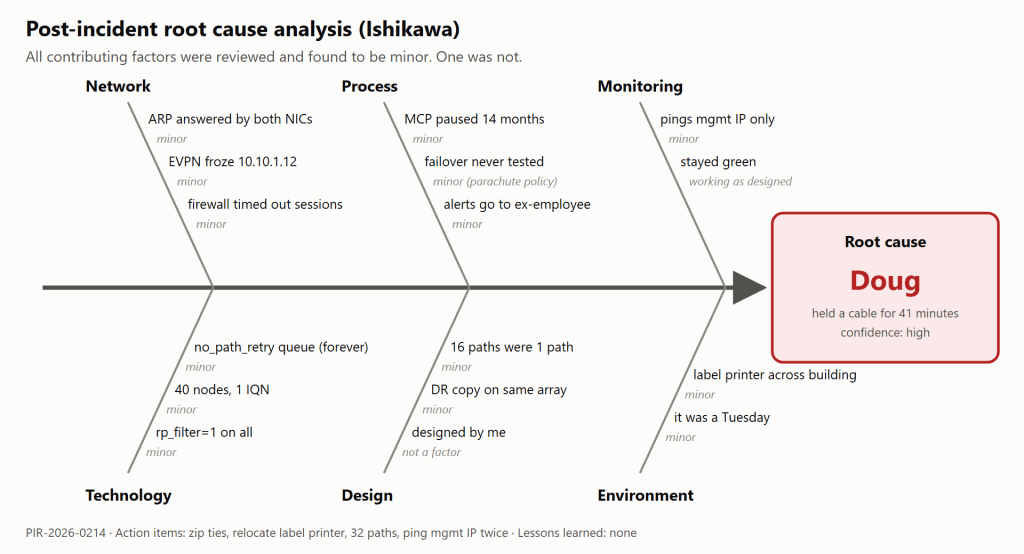
Figure 6. The root cause analysis. We were thorough.
Action items:
- Zip-tie all storage cables to the rack.
- Move the label printer into the data center.
- Go from sixteen paths per volume to thirty-two.
- Have monitoring ping the management IP twice.
- Pause the MachineConfigPool again so this doesn’t happen again.
Doug has since been promoted to storage architect, since Doug is the only person here who has ever actually tested our failover.
We didn’t come up with any lessons learned. The design did what I designed it to do.
Editor’s note: all of the advice above is wrong on purpose. If you got here from a search during a real outage, sorry, and close this tab. The four-part series this post ignores explains what to actually do about interface binding and ARP flux, LACP versus multipath, routed storage and VRFs, and OpenShift. It’s on vSkeeBall. Go pull a cable before Doug does.


Leave a comment